Buying or renting AI compute in 2026 is a very different exercise than it was even eighteen months ago. The accelerators are bigger and hotter, the networks around them matter as much as the silicon, lead times are measured in quarters, and the rent-versus-buy math now turns on a handful of variables that are easy to get wrong. This guide walks through four things every serious buyer needs to understand before signing anything: how modern GPU servers are actually architected, what "bare metal" buys you in measured performance, what procurement really looks like today, and how to run the total-cost-of-ownership numbers honestly.
Figures below reflect the market as of mid-2026. Prices in particular move quickly, so treat them as reference points and confirm live numbers before you commit.
1. GPU server architecture: the box is a network, not a card
The single most important mental shift for enterprise buyers is that a modern AI server is not "a computer with some GPUs in it." It is a tightly-coupled fabric of accelerators, and its performance is governed as much by how the GPUs talk to each other as by any single chip's FLOPS.
SXM baseboards vs PCIe cards
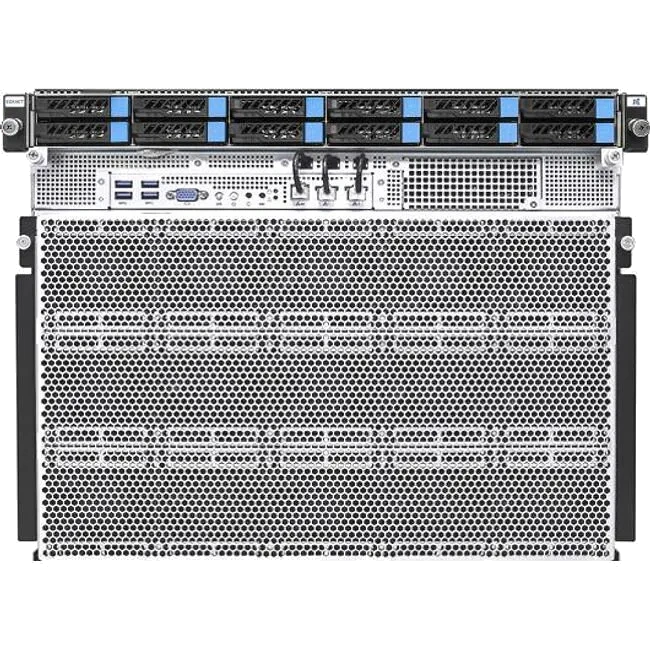
There are two fundamentally different ways to buy an NVIDIA data-center GPU. PCIe cards slot into a standard server, draw a more modest 350-600W, and communicate over the PCIe bus (optionally bridged in pairs with NVLink). They are the pragmatic choice for inference and mixed workloads where you don't need every GPU to act as one. SXM modules mount onto an HGX baseboard and are wired together through NVSwitch into an all-to-all mesh, drawing 1,000W and up. That mesh is the whole point: it lets eight or more GPUs behave like a single very large accelerator, which is what large-model training and high-throughput inference actually require.
HGX B200 and HGX B300
The 8-GPU HGX baseboard is the workhorse of the Blackwell generation. Two variants matter:
| Per-GPU spec | HGX B200 (Blackwell) | HGX B300 (Blackwell Ultra) |
|---|---|---|
| HBM3e capacity | ~180 GB (1.44 TB per 8-GPU board) | ~288 GB (2.3 TB per board) |
| Memory bandwidth | up to 8 TB/s | up to 8 TB/s |
| Approx. TDP | ~1,000 W | ~1,400 W |
| Cooling | Air-capable | Liquid recommended/required |
One naming trap worth flagging: NVIDIA's HGX baseboard documentation and OEM guides list 180 GB per B200 GPU (1.44 TB across the board), while marketing materials often quote 192 GB for full-spec binning. Both are "correct" for different products - when you're comparing quotes, confirm which number a vendor is actually shipping.
Rack-scale: GB200 and GB300 NVL72
Above the 8-GPU box sits the rack as the unit of compute. In an NVIDIA GB200 NVL72, 72 Blackwell GPUs and 36 Grace CPUs are joined into a single NVLink domain. NVLink 5 delivers 1.8 TB/s per GPU, and the rack's NVSwitch fabric provides on the order of 130 TB/s of aggregate all-to-all bandwidth - so all 72 GPUs address each other at memory-like speeds. That density comes at a cost: a GB200 NVL72 draws roughly 120 kW and is liquid-cooled by design. The GB300 NVL72 pushes further, with substantially more total HBM3e (in the ~20 TB range across the rack) and rack power climbing toward ~140 kW.
This is why "can your facility take it?" is now a first-order procurement question. A single Blackwell rack can exceed the power and cooling budget of an entire legacy row.
The AMD alternative
AMD's Instinct line is a genuine option, particularly where memory capacity per GPU matters. The MI300X ships 192 GB of HBM3 at 5.3 TB/s; the MI325X raises that to 256 GB of HBM3e at 6 TB/s; and the MI350 series (MI350X/MI355X, CDNA 4), launched in mid-2025, reaches 288 GB of HBM3e at up to 8 TB/s and adds FP4/FP6 datatypes. The MI355X's top bin runs near 1,400W and is liquid-cooled. AMD's scale-out story leans on open standards - Ultra Ethernet and UALink - which are compelling on paper; just weigh the maturity of that ecosystem against NVLink, which is shipping at scale today. For a head-to-head on the two most-compared AMD parts, see our MI325X vs MI300X breakdown.
The network is half the machine
Scale-out beyond a single rack runs over one of two fabrics. InfiniBand (NDR at 400 Gb/s per port, XDR at 800 Gb/s, with Quantum-X800 switching) remains the default for the largest training clusters thanks to in-network reductions (SHARP) and low, deterministic latency. Spectrum-X, NVIDIA's Ethernet-for-AI platform, is the increasingly popular alternative where operators want to stay on Ethernet, and AMD-centric builds pair Instinct with Ultra Ethernet. ConnectX-8 SuperNICs and BlueField DPUs handle the host-side networking and storage offload. The takeaway for buyers: when you evaluate a cluster, scrutinise the interconnect and the per-node NIC bandwidth as hard as you scrutinise the GPUs - a fabric bottleneck will strand a lot of very expensive silicon.
You can browse current 8-GPU and rack-scale systems on our GPU server listings.
2. Bare-metal instance benchmarks: what single-tenancy actually buys
"Bare metal" gets used loosely. Precisely, it means you get the physical server with no hypervisor between your workload and the hardware - full, single-tenant access to the GPUs, the NVLink/NVSwitch fabric, and the NICs, with native GPUDirect RDMA.
How much does virtualization actually cost?
Less than folklore suggests, and more than vendors imply - it depends entirely on what is virtualized. For compute-bound GPU kernels, GPU passthrough is near-native: the canonical academic measurements put passthrough at roughly 96-99% of bare-metal performance, i.e. low single-digit overhead. Several neoclouds now advertise "bare-metal-class" VMs precisely because they pass the GPU and the InfiniBand NIC straight through and only virtualize the incidental rest of the box.
The real, felt cost of virtualization shows up in two places that passthrough does not fix: partitioning (vGPU or MIG time-slicing, where you share a physical GPU and inherit scheduling jitter) and virtualized network and interrupt paths on multi-node jobs, where the hypervisor sits in the data path. Bare metal removes both. So the honest framing is: for a single-node, compute-bound job, a well-configured passthrough VM is within a few percent of bare metal; for large multi-node training with tight collective communication, or for latency-sensitive inference, single-tenancy and native fabric access are where bare metal earns its premium - through determinism and the absence of noisy neighbours as much as raw throughput.
Reading MLPerf like a buyer
MLPerf is the most useful public yardstick, provided you compare like for like. A few reference points from recent rounds:
- Training v5.0 (2025): GB200 NVL72 systems delivered roughly 2.2-2.5x the throughput of H100 on Llama-family fine-tuning and pre-training tasks.
- Training v5.1 (late 2025): added B300; on Llama-2-70B LoRA, an 8-GPU B300 node came in around 12-13% ahead of the equivalent B200 node.
- Training v6.0 (mid-2026): headline runs included DeepSeek-V3 (671B) trained in about 2 minutes on ~8,000 GB300 GPUs, and Llama-3.1-405B pre-training under 10 minutes at scale.
- Inference v5.0 (2025): on Llama-3.1-405B, GB200 NVL72 posted 200+ tokens/second per GPU in FP4 - several times an H200's FP8 result on the same model.
Two cautions. First, always confirm whether a quoted figure is per-chip or per-rack; rack-scale results flatter a single accelerator if you misread them. Second, verify any number you plan to rely on against the official MLCommons results tables rather than a vendor blog. Used carefully, MLPerf is the closest thing to an apples-to-apples benchmark the industry has.
The bare-metal trade-offs
Single-tenancy isn't free. You pay for the whole box whether or not you fill it, provisioning is slower and less elastic (no scale-to-zero), and more of the operational burden - firmware, fabric configuration, hardware-failure handling - shifts to you or your provider's support tier. For steady, high-utilization training and inference, that's a good trade. For spiky, experimental, or bursty workloads, virtualized or shared capacity often wins on economics.
3. Enterprise hardware procurement in a constrained market
The uncomfortable truth of 2026 is that the binding constraint on AI infrastructure is rarely the GPU die itself - it's memory and packaging.
Lead times and allocation
Availability has improved from the worst of 2024-2025 but remains uneven. Priority OEM channels have quoted Blackwell B200 systems in roughly the 8-16 week range, while buyers outside allocation priority still report much longer waits, and rack-scale GB200/GB300 remains allocation-gated. H200-class systems are comparatively available, sometimes within weeks through OEMs and effectively immediately on the cloud. The practical consequence: when you buy at the front of this queue, you are partly buying a place in line, and multi-vendor sourcing is how buyers avoid being captive to a single supplier's allocation.
The HBM and packaging squeeze
Behind the lead times sits a memory supply crunch. Memory makers have signalled extremely tight high-bandwidth-memory supply - one major supplier indicated it expected to sell out its entire year's HBM allocation - and conventional DRAM has been swept up in the same wave. Industry trackers reported conventional DRAM contract prices rising on the order of 90%+ quarter-on-quarter in early 2026, with further increases forecast and meaningful new capacity not expected until later in 2027. On the packaging side, TSMC's CoWoS advanced-packaging capacity is the other bottleneck, with the largest buyers reportedly booking the bulk of near-term output. We covered this dynamic in depth in the global HBM squeeze.
For buyers, this means two things: server prices have a memory-cost tailwind pushing them up, and "just wait for prices to fall" is a weaker strategy than usual for at least the near term.
Who you actually buy from
The major OEMs - Dell (PowerEdge XE9680 for 8-way HGX, XE9712 for GB200 NVL72), Supermicro, GIGABYTE, HPE/Cray, Lenovo, ASUS and AMAX - largely channel the same NVIDIA HGX and NVL72 reference designs. Differentiation shows up in cooling engineering, rack integration, density, support, and crucially allocation and lead time. Because the underlying board is common, a marketplace that aggregates capacity across multiple suppliers gives buyers price transparency and a way to take whichever verified vendor can actually deliver on your timeline, without lock-in. That's the model we run at GPU Vendors, and you can read buyer reviews before you engage a supplier.
4. Cloud compute TCO: renting, buying, and the break-even that matters
The rent-versus-buy decision is where a lot of budgets are won or lost. Do the math with fully-loaded costs, not sticker prices.
What renting costs
On-demand hourly rates vary enormously by provider tier. As of mid-2026, per-GPU on-demand pricing looked roughly like this:
| GPU | Neocloud on-demand (per GPU/hr) | Hyperscaler on-demand (per GPU/hr) |
|---|---|---|
| H100 | ~$1.90-$3.30 | ~$7-$12 |
| H200 | ~$2.30-$6.00 | ~$10+ |
| B200 | ~$3.75-$8.60 | higher / limited |
| AMD MI300X | ~$1.70-$2.00 | ~$6-$8 |
Reserved and committed-use terms typically cut those figures by roughly 25-35% at one year and 35-50% at three years. Spot/pre-emptible capacity is cheaper still if your workload can tolerate interruption. For a deeper single-GPU treatment, see renting vs buying an H100.
What owning costs
Street prices for complete 8-GPU systems, as of mid-2026, ran approximately: HGX H100 around $250k - $320k, HGX H200 around $310k, and HGX B200 in the $400k - $500k range (roughly $50k+ per GPU). Rack-scale GB200 NVL72 systems land in the low-single-digit millions. But the purchase price is only the beginning - you also carry power, cooling, colocation or facility cost, networking, spares, staff, and depreciation.
The break-even
Ignore infrastructure entirely and the arithmetic is seductive: a ~$25k GPU against a ~$3/hour rental breaks even around 8,000 GPU-hours, i.e. under a year of continuous use. But fully loaded - adding the power, cooling, rack, networking and operations that surround the card - the honest rule of thumb is that owning wins only above roughly 50-70% sustained utilization held over one to three years. More conservative analyses argue you need something closer to 18+ months of near-continuous utilization before an owned H100 beats reserved cloud. Utilization is the variable that decides it: hardware that sits idle is far more expensive to own than to rent.
Power, cooling and depreciation
Two often-missed line items round out the picture. First, facility cost: high-density AI colocation is commonly billed per kilowatt per month, with US averages reported around $196/kW/month in late 2025 and premium metros well above that - a meaningful number when a single Blackwell rack pulls 120 kW. Second, depreciation: hyperscalers publicly depreciate AI servers over roughly five to six years, and notably at least one large operator shortened a portion of its fleet from six years to five, citing the pace of AI hardware innovation. There is an active debate about whether even five years is too long given NVIDIA's roughly annual cadence - the counter-argument being the "value cascade," where GPUs retired from frontier training still have years of useful life serving inference. Whatever assumption you adopt, make it explicit in your model, because the depreciation schedule quietly drives the whole TCO.
Putting it together
The buyers who come out ahead in this market do four things well. They evaluate a server as a fabric - GPUs, NVLink domain, and network together - rather than as a spec sheet of FLOPS. They match the tenancy model to the workload, paying the bare-metal premium only where determinism and native fabric access actually pay back. They treat procurement as a supply-constrained sourcing problem and keep multiple verified vendors in play rather than betting on one allocation. And they run TCO on fully-loaded costs with an honest utilization assumption, letting that single number - not the hourly rate or the sticker price - drive the rent-versus-buy call.
Ready to act on it? Compare GPUs and servers side by side, browse AI accelerators and cloud rental options, or request quotes from multiple verified vendors in one place. If you're a supplier, you can list your inventory and reach buyers who are actively comparing.